Post 15 ended its break-it section on its own limit: “None of this gives the binary anywhere else to load from: a dead tab is honest, and it is not a working app.” This post gives the binary somewhere else. Every release build now carries a copy of each remote, and the app runs from those copies when the content delivery network (CDN) cannot be reached, or when one remote fails to load while the other keeps loading from it.
Post 1 said who builds that: “Module Federation gives you none of the offline story by itself: shipping a copy of each remote inside the binary, so the reviewed app works on its own with no network, is an architecture you build.” It also set the requirement for a remote that will not load: “the app has to degrade to something safe instead of showing a blank screen.” Post 15’s build meets the requirement for a remote that will not load, and stops there. With the CDN out of reach it launches unresolved, with an error state in either tab. When one remote fails, its tab shows the error state, and Try again never brings the tab back.
The first half builds the copy: a build step that stages it, a phase on each platform that puts it in the binary, and a new launch mode, bundled, that runs every remote from it. The second half builds two nets for a CDN launch. One catches a manifest the CDN cannot serve and drops that one remote to its copy; the other sits around each tab and catches a load that fails later. A Try again that actually retries comes with the second net.
One rule shapes the copy: it is the version already known to run on this binary, frozen on the day the binary was built. It is the guaranteed minimum: new versions still reach installed apps through the CDN, and the host uses the copy only when the CDN cannot deliver a version that loads.
Start from post 15’s finished state, the tag post-15-cdn-flip; this post finishes at post-16-fallbacks. As before, you type the configuration changes and the smaller edits, and copy the rest from the end tag: the build tool, the host’s code and tests, the native files and one design-system test.
The launch decides the mode once, before anything federated loads. Using the CDN’s versions means a usable map arrived and its versions registered; when they cannot be used, the launch registers the copies instead. It ends unresolved only when that fails too. The two nets act inside a CDN launch, one remote at a time.
Put a copy of each remote in the binary
A copy is chosen by the same map that picks versions from the CDN. The version a binary carries is the one its own app version’s map names, because that is the version known to run on that binary: for the 2.0.0 build here, list 1.2.0 and party 1.0.0.
The copy holds that version’s signed bundles and its manifest, byte for byte as the CDN serves them. The bytes stay as they are because every bundle is still verified against the signing key when it loads, and a change to its code fails the check.
tools/build-cdn.mjs already builds every version into cdn-root/, and it now stages the copies as well. Fetch the end tag once, since every copy command in this post takes its files from it, and take the tool first:
npx degit@3.8.0 --force warrendeleon/react-native-module-federation#post-16-fallbacks /tmp/pokedex-ref-16cp /tmp/pokedex-ref-16/tools/build-cdn.mjs tools/The new stage runs after the CDN tree is built. For each platform it takes every version the map names and copies its bundles and manifest into embed-root/<platform>/<remote>/<version>/:
for (const [remote, version] of Object.entries(embeddedVersions)) {
  const published = join(cdnDir, remote, version);
  const embedded = join(embedDir, remote, version);
  mkdirSync(embedded, { recursive: true });
  // Every script of the version sits at the top of its directory with its manifest, and the copy
  // is all of them, byte for byte: the container, its chunks, index.bundle, which the manifest
  // names among the shared modules' assets, and mf-manifest.json, which the federation runtime
  // reads from the disk the way it reads it from the CDN. The assets/ folder beside them holds
  // images the host's shared copies of those libraries already carry.
  for (const file of readdirSync(published)) {
    if (file.endsWith('.bundle') || file === 'mf-manifest.json') {
      copyFileSync(join(published, file), join(embedded, file));
    }
  }
  bundledVersions[platform][remote] = version;
The copies keep the <remote>/<version>/ directories instead of sharing one folder, because two remotes can ship vendor chunks with the same file name. In one folder, the second would overwrite the first.
The build tool also records the copied versions in apps/host/src/shell/embedded-versions.ts, a generated file the host compiles in, so the host knows which copies it carries before it reads anything from the disk.
embed-root/ is build output, like cdn-root/, so add it to .gitignore:
# The copies build-cdn stages for the native embed phases.
embed-root/
Run the key generator first, then the tool for both platforms. The generator keeps any keys the checkout already has, and creates them on a fresh checkout of the tag, which has none because they never enter Git. After the CDN tree, the tool reports the copies and the generated file:
node tools/gen-signing-keys.mjs && node tools/build-cdn.mjsembedded -> embed-root/ios/listApp/1.2.0
embedded -> embed-root/ios/partyApp/1.0.0
embedded -> embed-root/android/listApp/1.2.0
embedded -> embed-root/android/partyApp/1.0.0
wrote -> apps/host/src/shell/embedded-versions.tsThe generated file records the version of each copy, per platform:
export const BUNDLED_VERSIONS: Record<string, Record<string, string>> = {
  ios: { listApp: '1.2.0', partyApp: '1.0.0' },
  android: { listApp: '1.2.0', partyApp: '1.0.0' },
};
The build tool stages the copy for the app version in MF_APP_VERSION, or for the newest app version with a map when that is unset, so a build for another app version runs the tool with the same variable first.
iOS: the last build phase
On iOS the copy goes inside the .app, next to main.jsbundle. A script does the copying, and a Run Script phase at the end of the Host target runs it. Copy the script from the end tag:
mkdir -p apps/host/scripts && cp /tmp/pokedex-ref-16/apps/host/scripts/embed-remotes-ios.sh apps/host/scripts/#!/usr/bin/env bash
# --- The copy in the binary, iOS's half. The last Run Script phase of the Host target copies each
# remote's embedded version from embed-root/ios into the app, at cdn/ios/<remote>/<version>/ next
# to main.jsbundle, where the host reads it through absolute file:// URLs: the signed bundles and
# the version's mf-manifest.json.
#
# The <remote>/<version>/ directories are kept rather than flattened: two remotes can ship vendor
# chunks with the same file name, and a flat copy would let one overwrite the other.
#
# It runs in every configuration. A Debug build loads the host's own bundle over http, so it cannot
# read the copy, and there the copy only costs the time it takes. Its remotes come from the dev
# servers when no CDN is configured, or from the CDN when one is.
#
# With embed-root missing it removes any copy an earlier build left behind, prints a warning and
# exits 0, and the build succeeds with nothing embedded. That is the trap: run
# `node tools/build-cdn.mjs` before a release build. ---
set -euo pipefail
REPO_DIR=$(cd "$(dirname "${BASH_SOURCE[0]}")/../../.." && pwd)
SOURCE="$REPO_DIR/embed-root/ios"
: "${CONFIGURATION_BUILD_DIR:?run this from an Xcode build phase}"
: "${UNLOCALIZED_RESOURCES_FOLDER_PATH:?run this from an Xcode build phase}"
DEST="$CONFIGURATION_BUILD_DIR/$UNLOCALIZED_RESOURCES_FOLDER_PATH/cdn/ios"
if [ ! -d "$SOURCE" ]; then
rm -rf "$DEST"
rmdir "$(dirname "$DEST")" 2>/dev/null || true
echo "warning: $SOURCE does not exist, so no remotes are embedded. Run 'node tools/build-cdn.mjs' before a release build."
exit 0
fi
mkdir -p "$DEST"
# --delete keeps the app to exactly what embed-root holds, so a version an earlier build embedded
# does not linger. The bytes are copied as they are: each bundle is signed over them.
rsync -a --delete --include='*/' --include='*.bundle' --include='mf-manifest.json' --exclude='*' "$SOURCE/" "$DEST/"
echo "embedded $(find "$DEST" -name '*.bundle' | wc -l | tr -d ' ') remote bundles and $(find "$DEST" -name 'mf-manifest.json' | wc -l | tr -d ' ') manifests into $DEST"The phase is one change to the project file. In Xcode it is a new Run Script phase on the Host target, named “Embed federated remotes (offline fallback)”, running "$SRCROOT/../scripts/embed-remotes-ios.sh", placed after every other phase, with “Based on dependency analysis” unchecked. It goes last so that the .app it writes into is already assembled. With the box unchecked it runs on every build, which a phase that declares no outputs does anyway: Xcode skips a script phase only when it has outputs to check. Declaring the copied files under the .app’s cdn/ios as outputs, with embed-root/’s files as inputs, is the alternative. The end tag’s project file carries the phase with the box unchecked, so copying it makes the same change:
cp /tmp/pokedex-ref-16/apps/host/ios/Host.xcodeproj/project.pbxproj apps/host/ios/Host.xcodeproj/Android: a Gradle task and a native module
On Android the copy goes into the assets of the APK, the Android package an app is installed from. At the end of apps/host/android/app/build.gradle, after post 15’s changes, add:
// --- The copy in the binary, Android's half. build-cdn stages each remote's embedded version under
// embed-root/android, the signed bundles and the version's mf-manifest.json, and this task mirrors
// that tree into the APK's assets at cdn/android, where EmbeddedRemotesModule copies it out at
// launch. Sync rather than Copy, so a file an earlier build embedded and this one does not is
// removed instead of shipped.
//
// With embed-root missing, this task embeds nothing, warnIfNothingToEmbed prints a warning, and the
// build still succeeds. That is the trap: a successful release build that carries no copies. Run
// build-cdn before a release build. ---
def embedSource = file("$rootDir/../../../embed-root/android")
def embeddedAssetsDir = layout.buildDirectory.dir("generated/embedded-remotes").get().asFile

def embedRemotes = tasks.register('embedRemotes', Sync) {
    from(embedSource) { include '**/*.bundle', '**/mf-manifest.json' }
    into(file("$embeddedAssetsDir/cdn/android"))
}

// --- A Sync with no source skips its actions, so a warning inside it would never print. Gradle
// still clears what the task embedded before when its source goes, so no stale copy ships. This
// task has no inputs or outputs, so it runs on every build, and it prints the warning when
// embed-root/android is missing. ---
def warnIfNothingToEmbed = tasks.register('warnIfNothingToEmbed') {
    doLast {
        if (!embedSource.exists()) {
            logger.warn("warning: ${embedSource} does not exist, so no remotes are embedded. Run 'node tools/build-cdn.mjs' before a release build.")
        }
    }
}

android {
    sourceSets {
        main {
            assets.srcDirs += embeddedAssetsDir
        }
    }
}

tasks.named('preBuild').configure { dependsOn embedRemotes, warnIfNothingToEmbed }
An asset is not a file on disk, and Re.Pack reaches a copy’s <remote>/<version>/ directory only through a real file path. So a small TurboModule copies assets/cdn out to the app’s files directory and resolves with the directory it used. Its spec is short enough to read whole:
import type { TurboModule } from 'react-native';
import { TurboModuleRegistry } from 'react-native';

// --- Android's half of the copy in the binary. A Gradle task packs each remote's embedded version
// into the APK's assets, and assets are not files on disk: Re.Pack's file:// loader needs a real
// path. prepare() copies them out to the app's files directory once per installed build, keeping
// the <remote>/<version>/ layout, and resolves with the directory the host builds file:// URLs
// against.
//
// There is no iOS implementation, because iOS reads the copies straight from the .app. That is why
// this uses TurboModuleRegistry.get, which returns null where the module does not exist, rather
// than getEnforcing, which would throw on iOS the moment this file loads. ---
export interface Spec extends TurboModule {
  /** Copy the embedded remotes out, once per installed build, and return the directory. */
  prepare(appVersion: string): Promise<string>;
}

export default TurboModuleRegistry.get<Spec>('EmbeddedRemotesModule');
The Kotlin side copies the tree once per install. A marker file holds the app version and the time the APK was installed or updated, so a relaunch reuses the extracted tree, and any new install replaces it, including a rebuilt APK that kept its version number. It copies the bytes as they are, since each bundle’s signature covers them. Take the module, its spec and the updated HostNativePackage, which registers it next to post 13’s navigation module, from the end tag:
cp /tmp/pokedex-ref-16/apps/host/specs/NativeEmbeddedRemotesModule.ts apps/host/specs/
cp /tmp/pokedex-ref-16/apps/host/android/app/src/main/java/com/host/{EmbeddedRemotesModule,HostNativePackage}.kt apps/host/android/app/src/main/java/com/host/| iOS | Android | |
|---|---|---|
| Where the copy goes | the .app, at cdn/ios/<remote>/<version>/ | the APK’s assets, at cdn/android/<remote>/<version>/, copied out to the files directory at launch |
| What puts it there | the last Run Script phase, embed-remotes-ios.sh | the embedRemotes Sync task, before preBuild |
| How the host finds it | the directory of main.jsbundle, read from React Native’s SourceCode module | the directory EmbeddedRemotesModule.prepare() resolves with |
Without embed-root/ | a warning, a successful build, no copy | a warning, a successful build, no copy |
Load a copy from the disk
The host changes in five files and their tests. Take them from the end tag. mf-modules.d.ts goes, because nothing loads a remote with import() any more (the Try again section says why), and the design system gains a contrast check for the banner’s new colour:
cp /tmp/pokedex-ref-16/apps/host/src/shell/{remoteLocator,scriptManager,federationErrors}.ts /tmp/pokedex-ref-16/apps/host/src/shell/FederationBanner.tsx apps/host/src/shell/
cp /tmp/pokedex-ref-16/apps/host/App.tsx /tmp/pokedex-ref-16/apps/host/jest.config.js apps/host/
cp /tmp/pokedex-ref-16/apps/host/__mocks__/{module-federation-runtime,partyApp-partySlice}.js apps/host/__mocks__/
cp /tmp/pokedex-ref-16/apps/host/__tests__/{remoteLocator,scriptManager}.test.ts /tmp/pokedex-ref-16/apps/host/__tests__/{App,RemoteBoundary,FederationBanner}.test.tsx apps/host/__tests__/
cp /tmp/pokedex-ref-16/packages/ui/src/tokens/__tests__/contrast.accessibility.ts packages/ui/src/tokens/__tests__/
rm apps/host/mf-modules.d.ts
The host first has to know where the copies are on the device. On iOS the answer comes from React Native’s own SourceCode module: a release build loads file:///…/Host.app/main.jsbundle, and the directory above that file is the .app. A development build loads its bundle from the dev server over http, so there is no directory to derive and no copy to use. On iOS, everything that runs from a copy needs a release build. On Android the directory is whatever prepare() resolved with:
const sourceCode = NativeModules.SourceCode as
  | { scriptURL?: string; getConstants?: () => { scriptURL?: string } }
  | undefined;
const SCRIPT_URL = sourceCode?.scriptURL ?? sourceCode?.getConstants?.().scriptURL;
const APP_PATH = SCRIPT_URL?.startsWith('file://')
  ? SCRIPT_URL.replace(/^file:\/\//, '').replace(/\/[^/]+$/, '')
  : undefined;

let embeddedRoot: string | undefined = Platform.OS === 'ios' ? APP_PATH : undefined;
Every script of a remote still goes through post 15’s resolver. It gains one branch: a remote that runs from its copy, in a launch that could not use the CDN’s versions, or after that one remote failed to load from the CDN, resolves to a file inside its copy:
return {
  kind: 'locate',
  locator: {
    url: `file://${input.embeddedRoot}/cdn/${input.platform}/${remoteName}/${version}/${filename}`,
    cache: true,
    absolute: true,
    verifyScriptSignature: input.verify,
  },
};
absolute: true is the detail that is easy to miss. Without it, Re.Pack keeps only the script’s file name and looks for it at the top level of the app: iOS asks the app bundle’s resources through URLForResource:withExtension:, and Android opens an asset of that name. Neither reaches a <remote>/<version>/ directory. With it, Re.Pack reads the file at the path as given.
Verification stays on. Re.Pack’s file loader on both platforms runs the same signature check as its download path, before the code runs, on every load. That makes the copy stricter than a cached download, which post 15 noted is run from the disk without a second check. It is also why the copy is never rewritten on its way into the app: change one byte of an installed copy’s code and the tab refuses it, failing the same hash check as a tampered download. On iOS the file loader reports the error’s full description, so the reason arrives behind the system’s generic prefix:
[Error: The operation couldn’t be completed. The bundle verification failed because the bundle hash is invalid.]On Android the message reads as it does for a tampered download, with no prefix.
The manifest needs no special handling. The copy carries mf-manifest.json beside its bundles, and the federation runtime reads it from a file:// URL the way it reads one from the CDN, because React Native’s fetch opens local files: through its file request handler on iOS, and on Android through the blob module’s handler, which takes any URL that is not http or https when the response type is blob, the type React Native’s fetch asks for.
Bundled mode: the day the CDN is unreachable
The launch now prepares the copies alongside the probe, since neither needs the other, and a launch with no usable map runs from them instead of giving up:
const [versions] = await Promise.all([
  CDN_CONFIGURED ? fetchVersionMap() : Promise.resolve(null),
  prepareEmbeddedCopies(),
]);
if (!versions) {
  return runFromCopies(CDN_CONFIGURED ? 'no usable version map' : 'no CDN configured');
}
// --- The launch that could not use the CDN: no usable map, no CDN configured, or a registration
// that failed. With copies in the binary it runs from them, every remote registered at its copy's
// manifest, which the runtime reads from the disk. With none, or when registering them fails too,
// there is nothing to run. ---
function runFromCopies(reason: string): FederationStatus {
const embedded = REMOTE_NAMES.filter(hasEmbeddedCopy);
if (embedded.length === 0) {
setStatus({ mode: 'unresolved', source: reason, versions: {}, embedded: [] });
return status;
}
const versions = Object.fromEntries(embedded.map(name => [name, bundledVersions[name]]));
setStatus({ mode: 'bundled', source: 'the copy in the binary', versions, embedded });
try {
registerRemotes(
embedded.map(name => ({ name, entry: embeddedManifestUrlFor(name) })),
{ force: true },
);
} catch (error) {
console.warn('[federation] the copies could not be registered', error);
setStatus({ mode: 'unresolved', source: 'remotes could not be registered', versions: {}, embedded: [] });
}
return status;
}Registering each remote at its copy’s manifest, with post 15’s force, sends the runtime to the disk for everything about that remote. From there nothing else is special: the runtime fetches the manifest, the resolver sends every script to the copy, and each one is verified as it loads. unresolved remains for a launch whose binary records no copy with a directory to load from, or where registering the copies fails.
Try it by taking the CDN away. Start the server as post 15 did, then make the Release build:
npx http-server@14.1.1 cdn-root -p 8000 -c-1 --cors( cd apps/host && MF_CDN_BASE=http://localhost:8000 MF_APP_VERSION=2.0.0 npm run ios -- --mode Release )The banner reads cdn · listApp 1.2.0 · partyApp 1.0.0. Stop the server and check that the map is gone:
curl -s -o /dev/null http://localhost:8000/ios/maps/2.0.0/version-map.json; echo $?7 means curl could not connect. Close the app and open it again. The probe fails within its 1.5 seconds, the banner turns purple and reads bundled · listApp 1.2.0 · partyApp 1.0.0, and both tabs open from the copies, with nothing asked of the network except PokéAPI for the Pokémon and GitHub for their artwork.
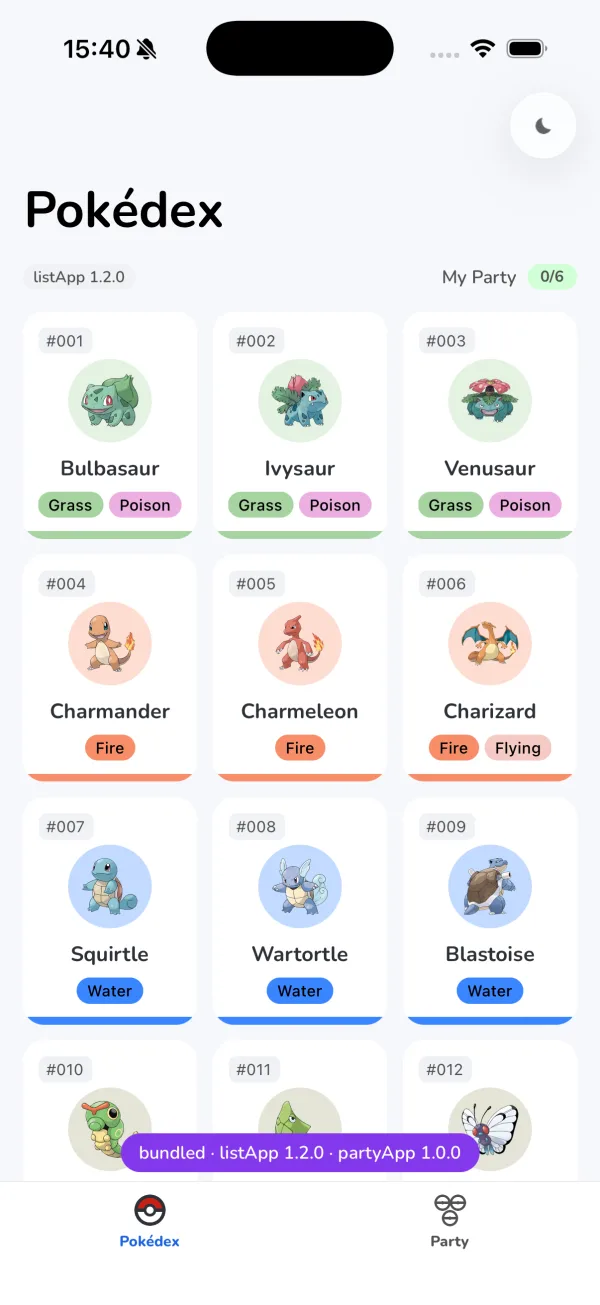
The copy is frozen at build time, and that is the trade-off. A binary built today and launched without the CDN next year runs today’s versions, whatever the CDN has shipped since. That is the part of post 1’s requirement a copy can meet: the reviewed code runs without the CDN. The Pokémon still come from PokéAPI, so with no network at all the list’s request fails and the screen shows its own error, “Couldn’t reach PokéAPI.”
Nothing about the failure is remembered either. The next launch asks the CDN again, and if a usable map arrives and its versions register, the app is back on the versions the map names.
A remote that fails in a CDN launch
Bundled mode covers a launch that could not use the CDN’s versions. The other failure is narrower: the launch uses the CDN’s versions, and then one remote fails. The cause might be a version retired from the CDN while a map still names it, a chunk cut off halfway, or a release that throws while its module initialises, which was post 15’s third break. In post 15’s build each of those leaves one dead tab. Two nets turn them into a tab that runs from its copy, while the other remote stays on the CDN.
The manifest net
Module Federation fetches a remote’s mf-manifest.json before any of its code loads. A tab’s boundary would hear of that fetch failing, but only once the runtime’s own fetch gives up, and the runtime sets no time limit on it. And not every load runs inside a boundary: the party’s state and styles modules ask for its manifest at boot, from an effect outside every tab. So the first net sits where the runtime asks for every manifest: a runtime plugin’s fetch hook, which the runtime calls before its own fetch, and which may answer with a Response or hand the request back by returning nothing:
const embeddedFallback: ModuleFederationRuntimePlugin = {
  name: 'embedded-fallback',
  fetch(url: string) {
    if (status.mode !== 'cdn') {
      return undefined;
    }
    const remote = manifestRemote(url, REMOTE_NAMES);
    if (!remote || !hasEmbeddedCopy(remote)) {
      return undefined;
    }
    if (fallbackRemotes.has(remote)) {
      return fetch(embeddedManifestUrlFor(remote));
    }
    return cdnManifestOrEmbedded(url, remote);
  },
};
registerPlugins([embeddedFallback]);
A CDN remote’s manifest is fetched from the CDN, within the probe’s 1.5-second limit. Any failed request (an error status such as a 404, a timeout or a dropped connection) drops that one remote to its copy and answers with the copy’s manifest instead:
async function cdnManifestOrEmbedded(url: string, remote: string): Promise<Response> {
  const controller = new AbortController();
  const timer = setTimeout(() => controller.abort(), PROBE_TIMEOUT_MS);
  try {
    const response = await fetch(url, { signal: controller.signal });
    if (response.ok) {
      return response;
    }
    console.warn(`[federation] ${remote} manifest returned ${response.status}`);
  } catch (error) {
    console.warn(`[federation] ${remote} manifest could not be fetched`, error);
  } finally {
    clearTimeout(timer);
  }
  fallBack(remote);
  return fetch(embeddedManifestUrlFor(remote));
}
A manifest that arrives with a success status goes back to the runtime as it is, even one that cannot be read. The runtime fails on that afterwards, and for a tab’s load the boundary net catches the failure.
fallBack adds the remote to a set and puts it on the banner, as listApp 1.2.0 embedded. The resolver reads that same set for every script, so the remote’s very next script resolves to its copy, while every other remote keeps its CDN URL. The set lives in memory on purpose: a remote drops to its copy only until the next launch, which asks the CDN again, so a failure that was only the network does not keep it there. Remembering failures across launches, and rolling a bad version back permanently, belongs to post 17.
Other tools already offer parts of this, and each would work at its own layer. Module Federation’s errorLoadRemote hook can return a fallback when a load fails, the manifest included. Its official retry plugin retries a failed load and can rotate between backup domains, and Re.Pack’s script locator takes retry and retryDelay. The fetch hook was the fit here for two reasons. errorLoadRemote hears of a failure only after the runtime’s fetch gives up, as the boundary does, while the fetch hook makes the request itself and can put the probe’s time limit on it. And retrying is a different policy: it spends time asking the same CDN again, where this net answers at once from a copy the binary already has and leaves the next attempt to the next launch. Retries could sit in front of the net, at the cost of a longer wait before the copy.
Try the net with a version the CDN no longer holds. Start the server again, move the list’s version out of it, and cold-start the app:
mv cdn-root/ios/listApp/1.2.0 /tmp/listApp-1.2.0The list’s manifest comes back 404, the list runs from its copy, and the party still loads from the CDN, which the server’s log shows:
[2026-09-29T14:40:27.102Z]  "GET /ios/listApp/1.2.0/mf-manifest.json" "Host/1 CFNetwork/3860.500.112 Darwin/27.0.0"
[2026-09-29T14:40:27.103Z]  "GET /ios/listApp/1.2.0/mf-manifest.json" Error (404): "Not found"
[2026-09-29T14:40:27.120Z]  "GET /ios/partyApp/1.0.0/mf-manifest.json" "Host/1 CFNetwork/3860.500.112 Darwin/27.0.0"
[2026-09-29T14:40:27.159Z]  "GET /ios/partyApp/1.0.0/partyApp.container.js.bundle" "Host/1 CFNetwork/3860.500.112 Darwin/27.0.0"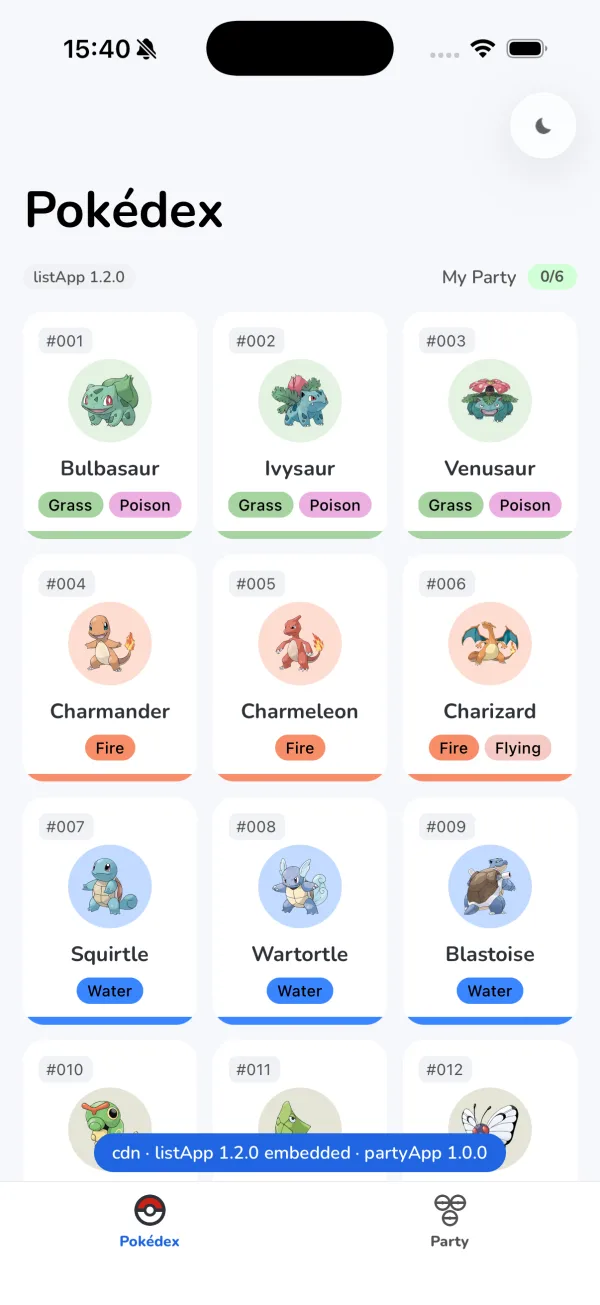
Move the directory back before going on:
mv /tmp/listApp-1.2.0 cdn-root/ios/listApp/1.2.0If every remote drops to its copy, check that the app can reach the server. A banner that marks both remotes embedded, or reads
bundled, while the server is running usually means the app could not reach it: iOS's App Transport Security and Android's cleartext rules refuse plain http if the build does not allow it. This host allows local networking on iOS and, on Android, cleartext only tolocalhost,127.0.0.1and10.0.2.2, with their subdomains.
The boundary net
Some failures come after a manifest that arrived fine: a container or a chunk that does not arrive or does not verify, or a module that throws while it is evaluated. They fail the tab’s load, and the tab’s load runs inside the RemoteBoundary that post 11 put around each tab. The boundary is the second net, and it stays a class component, because React has no way yet to write an error boundary as a function component. It now asks one question before it shows the error state: did the load fail, so the remote never produced a component, and is there a copy this remote has not dropped to yet?
componentDidCatch(error: unknown) {
  console.warn(`${this.props.remote} failed`, error);
  if (this.dropsToCopy()) {
    fallBackAndReload(this.props.remote);
    this.nextAttempt();
  }
}
// A failure the copy in the binary can answer: the load failed, so the remote never produced a
// component, and this remote has a copy it has not dropped to yet.
dropsToCopy() {
return !this.loaded() && canFallBack(this.props.remote);
}When it can, the boundary drops the remote to its copy and loads the tab again, rendering the loading state in the meantime, so the error state never appears. canFallBack allows it once per remote, only in a CDN launch, and only for a remote that has a copy. When it cannot, because the copy failed too, or there is none, the tab shows the error state as before.

A remote whose load returned a component keeps its error state when that component throws. That is a decision, and it rests on whether the remote produced a component. Before it does, the tab is still showing its loading state, so a swap to the copy is invisible. Once the load has returned a component, the boundary keeps that version, even when the component throws on its very first render. It records the attempt whose load arrived with a component, not whether the screen was ever shown, so a failure in that attempt counts as thrown by the remote’s own code, which has already run in this session. Until the map names a different version, the copy is that same version anyway. So the boundary shows “This tab stopped working” and offers Try again, which renders the remote again and recovers an error that does not repeat. An error that repeats leaves the tab on its error state for the rest of the session, and after a relaunch for as long as the map names that version, even with a working copy in the binary.
The boundary net does not cover the party’s two boot modules: they load from an effect outside every tab, so the host only logs a failure the manifest net does not answer. When the state module fails, adding to the party stays disabled until the Party tab loads, because that tab injects the state itself; a failed styles module does not affect adding.
Post 15’s third break is now a failed load the copy can answer. Its release throws while its module initialises, and post 15’s evaluation window turns that throw into a failed load instead of a fatal report. Build it again. Add the same line below the imports of apps/list/src/PokedexScreen.tsx:
throw new Error('PokedexScreen failed to initialise');Then ship it as 1.4.0, the way post 15 did:
( cd apps/list && MF_REMOTE_VERSION=1.4.0 npm run bundle:ios:prod ) && rsync -a --exclude '*.map' --exclude mf-stats.json apps/list/cdn/ios/listApp/1.4.0/ cdn-root/ios/listApp/1.4.0/Delete the line, point the 2.0.0 map at 1.4.0 and relaunch. The tab drops to the 1.2.0 copy: the chip says 1.2.0, the banner marks the list embedded, and the simulator’s log has no RCTFatal in it. Put the map back to 1.2.0.
The boundary net also catches a CDN that disappears mid-session. Launch with the server running and leave the Party tab unopened. Add a Pokémon from the Pokédex, stop the server, then open Party for the first time. Only the party’s state and styles modules loaded at boot, so its screens are not on the device yet: the download fails, and the tab shows a spinner for a moment and then the party from its copy, with the Pokémon you added and the banner reading partyApp 1.0.0 embedded. Removing the Pokémon there works too, because the copy’s screens and the state module that loaded from the CDN share the host’s one store.
A Try again that retries
In post 15’s build, Try again on a tab whose load failed never brings the tab back. Three records of the failed load stand between Try again and a fresh attempt.
The first is React’s. A lazy component calls its load function once: the React documentation says “Both the returned Promise and the Promise’s resolved value will be cached, so React will not call load more than once”, and a rejection goes to the nearest error boundary. The boundary already handled that, by mounting a new lazy component under a new key for every attempt.
The second is the host bundle’s, and it is the one that kept post 15’s tabs dead. An import('listApp/ListStack') compiles into a module of the host’s own bundle, and the bundle keeps each module it has evaluated for the rest of the session. After a failed load it keeps what the failure left behind, a module with nothing in it, and every later import() settles with that, even when the retry downloads the remote successfully. Measured on an iOS Release build: the retry fetched the manifest and both chunks, and the import still resolved without a component. So the tabs, and the two modules the party loads at boot, no longer use import(). They ask the federation runtime directly, every time:
export async function loadRemoteModule<T>(id: string): Promise<T | undefined> {
  const factory = await loadRemote<() => T>(id, { loadFactory: false, from: 'runtime' });
  return factory ? factory() : undefined;
}
It asks for the module’s factory rather than its exports, with loadFactory: false, which is how post 15’s evaluation window gets to wrap it: the runtime hands back the window’s wrapper, and calling it here evaluates the module inside the window.
The third is the federation runtime’s. In @module-federation/runtime-core 2.9.0, the version this series installs, its record of a remote outlives a failed load: it keeps the remote’s entry, the manifest it read, the container it loaded, and a container load that failed, which it hands back to every later request. The remote’s chunk registry, a global array named after the remote’s uniqueName, also keeps every chunk its last container fetched, and a new container installs all of them before fetching anything. Try again clears both before it loads again:
function reloadRemote(remote: RemoteName, entry: string): void {
  try {
    registerRemotes([{ name: remote, entry }], { force: true });
  } catch (error) {
    console.warn(`[federation] ${remote} could not be registered again`, error);
  }
  delete (globalThis as Record<string, unknown>)[CHUNK_REGISTRY[remote]];
}
Registering the remote again with force removes the runtime’s record, the container’s global included, and points the next load at entry. Try again reads entry back from the runtime instead of building it, which works in every mode, including development, where only the build knows the dev server’s URL. A remote that dropped to its copy still retries its copy, because the manifest net and the resolver both send any remote in the set to its copy.
Re.Pack’s script cache needs no clearing for a failed load: once a resolved script’s load settles, Re.Pack drops its promise, and a download that fails verification is never written to its cache, on either platform. A refusal from the resolver is the exception. It comes before that cleanup, so Re.Pack keeps the rejection and hands it back to every later request for the same script. This host’s resolver refuses only a remote it has no version or copy for.
One gap stays open: Try again cannot cancel a download already in flight. A chunk the failed container was still fetching lands in whichever registry exists when it arrives, and when a script is still loading, Re.Pack answers a new request for it with the promise already outstanding. When the copy is the version the CDN was serving, the default, those are the same bytes either way; when the map names a different version, a late chunk from the CDN can land beside the copy’s container.
A render error shows Try again recovering a tab whose code has already loaded. The boundary net’s mid-session demo stopped the server, so start it again and leave it running:
npx http-server@14.1.1 cdn-root -p 8000 -c-1 --corsThen make the list’s screen throw while it renders, for its first eight seconds. Below the imports of apps/list/src/PokedexScreen.tsx add:
const LOADED_AT = Date.now();and as the first lines of PokedexScreen():
if (Date.now() - LOADED_AT < 8000) {
  throw new Error('PokedexScreen render failed');
}
The throw has to last: React retries a render that fails, so an error that stops too soon recovers before the boundary’s error state is ever shown. Ship it as its own version, the way 1.4.0 shipped, then delete the lines and point the 2.0.0 map at 1.5.0:
( cd apps/list && MF_REMOTE_VERSION=1.5.0 npm run bundle:ios:prod ) && rsync -a --exclude '*.map' --exclude mf-stats.json apps/list/cdn/ios/listApp/1.5.0/ cdn-root/ios/listApp/1.5.0/Relaunch and the tab shows “This tab stopped working”. Wait out the eight seconds and press Try again: the list renders on 1.5.0, and the server’s log shows no new request, because the code had loaded and only needed rendering again. Put the map back to 1.2.0 afterwards.
The failures and what each one costs, side by side:
| Failure | Caught by | What the user sees |
|---|---|---|
| The CDN cannot be reached at launch | the launch, in bundled mode | every tab from its copy, and a purple banner |
| A remote’s manifest fails: a 404, a timeout, a dropped connection | the manifest net | the tab from its copy, marked embedded on the banner |
| A tab’s remote code does not arrive, does not verify, or throws as its module initialises | the boundary net | a moment of loading, then the tab from its copy |
| The party’s state module fails at boot, once its manifest has arrived | nothing: the host logs it | adding to the party stays disabled until the Party tab loads |
| The party’s styles module fails at boot, once its manifest has arrived | nothing: the host logs it | adding still works |
| The copy fails as well, or there is no copy | the boundary | ”This tab could not load”, with Try again |
| The remote’s component throws as it renders | the boundary | ”This tab stopped working”, with Try again |
Now break it
Both embed steps succeed without embed-root/, and that is the trap. Move it out and rebuild the Release build, this time with --verbose:
mv embed-root /tmp/embed-root && ( cd apps/host && MF_CDN_BASE=http://localhost:8000 MF_APP_VERSION=2.0.0 npm run ios -- --mode Release --verbose )The build succeeds, and the phase’s warning is the only sign that anything is missing. Without --verbose, npm run ios shows a spinner in place of the build’s output (or passes the output through xcbeautify or xcpretty, when one is installed), then reports success Successfully built the app and launches. With --verbose, the warning sits among the build’s own lines:
debug warning: …/embed-root/ios does not exist, so no remotes are embedded. Run 'node tools/build-cdn.mjs' before a release build.
debug ** BUILD SUCCEEDED ** [11.716 sec]
success Successfully built the app
Stop the server and cold-start the app. The banner still says bundled · listApp 1.2.0 · partyApp 1.0.0, because the host compiled in the versions it was told it carries, and both tabs say “The app’s own copy of this remote could not be loaded”.
Build the CDN tree, then the release build, every time. The embed phases copy whatever
embed-root/holds when they run, and when it is missing they let the build succeed with nothing more than a warning in the build's output. A release build made beforenode tools/build-cdn.mjs, or afterembed-root/was cleaned, builds successfully with no copy in it, and nothing fails until the app needs a copy: when the launch cannot use the CDN's versions, or when one remote fails.
Move it back and rebuild before going on:
mv /tmp/embed-root embed-root && ( cd apps/host && MF_CDN_BASE=http://localhost:8000 MF_APP_VERSION=2.0.0 npm run ios -- --mode Release )Run it
The copies and the CDN tree, then the server:
node tools/gen-signing-keys.mjs && node tools/build-cdn.mjsnpx http-server@14.1.1 cdn-root -p 8000 -c-1 --corsThe Release build on iOS, then Android with the emulator’s address for the machine:
( cd apps/host && MF_CDN_BASE=http://localhost:8000 MF_APP_VERSION=2.0.0 npm run ios -- --mode Release )( cd apps/host && MF_CDN_BASE=http://10.0.2.2:8000 MF_APP_VERSION=2.0.0 npm run android -- --mode release )With either running, stop the server and cold-start for bundled mode, or move one version out of cdn-root for the manifest net. On Android the extracted copies sit in the app’s files directory, under files/cdn/android/, with the .installed marker beside them in files/cdn/.
The suites, the smoke test and the key generator’s tests:
( for d in apps/host apps/list apps/party packages/ui; do ( cd "$d" && npx jest --silent ) || exit 1; done ) && sh scripts/federation-smoke.sh && node --test tools/gen-signing-keys.test.mjsWhat you built, and what’s next
The demos in this post ran on an iOS Release build, and the copies, their extraction and bundled mode on an Android release build as well.
A remote that fell back is forgotten at the next launch, so a version that keeps failing fails again on every launch before its copy takes over. Remembering failures belongs with the other open problem: the map every binary trusts is still a plain text file anyone who can write to the bucket can change.
Next: signing that map, a counter that makes the app reject an older map, and an app that rolls a failing version back by itself.
Sources
- React: lazy — the load function called once, its promise and resolved value cached, and a rejection thrown to the nearest error boundary
- React source: ReactLazy at 19.2.3 — a rejected load stored on the lazy component and thrown again on every later render
- React: Component, catching rendering errors with an error boundary — “There is currently no way to write an Error Boundary as a function component”
- Module Federation: runtime hooks — the
fetchhook for manifest requests, returningPromise<Response> | void | false, anderrorLoadRemote - Module Federation source: runtime-core SnapshotHandler at 2.9.0 — a manifest asked of the
fetchhook first, then of the globalfetch, then oferrorLoadRemoteon failure - Module Federation source: runtime-core remote/index.ts and utils/load.ts at 2.9.0 —
registerRemoteswithforcecallingremoveRemote, which deletes the remote’s entry, manifest, container global and container-loading promise; a failed container load’s promise kept and returned to later loads until then - Module Federation: retry plugin — retries and backup domains for failed loads
- Re.Pack source: ScriptManager types at 5.2.5 — the locator’s
absolute,retryandretryDelay - Re.Pack source: ScriptManager.ts at 5.2.5 — a resolved script’s promise deleted once its load settles, failed or not; a resolver’s rejection comes before that cleanup and is kept
- Re.Pack source: ScriptManager.mm at 5.2.5 — a file:// script read at its absolute path, or by name through
URLForResource:withExtension:, and verified before it runs; a download written to the cache only after it verifies - Re.Pack source: FileSystemScriptLoader.kt and RemoteScriptLoader.kt at 5.2.5 — the same on Android, with an asset opened by its file name when the path is not absolute, and a download verified before it is written
- Apple: URLForResource:withExtension: — a resource looked up by name in the bundle, beside the variant that takes a subdirectory
- swift-build source: ShellScriptTaskProducer.swift at swift-6.2.1-RELEASE — a Run Script phase that declares no outputs, or is set to run always, runs on every build
- React Native CLI source: buildProject.ts at 20.2.0 — without
--verbose, the build’s output piped throughxcbeautifyorxcprettywhen one is installed, and a spinner otherwise - React Native source: RCTSourceCode.mm at 0.85.3 —
scriptURL, the URL the JavaScript bundle loaded from - React Native source: RCTFileRequestHandler.mm and RCTAppSetupUtils.mm at 0.85.3 — file:// requests answered on iOS, and the handler registered with the app’s networking
- React Native source: BlobModule.kt at 0.85.3 — any URL that is not http or https, read on Android when the response type is
blob - Android: AssetManager — assets opened and listed from the APK, not as files
- Gradle: Sync — a copy that also removes files the source no longer has
- react-native-module-federation — the companion repo, the build at the tag
post-16-fallbacks